01
Install & Connect
Configure admin credentials, access the web UI, and define source and destination connections with integrated diagnostic connectivity tests.
Luciai Tecnologia
Read from source, transform if needed, write to destination.
Luciai Multiconnector reads values at the source, adjusts scaling or data types when needed, and writes to the destination. OPC UA, OPC DA, MQTT, Siemens S7, Modbus TCP, PI, and CSV in a single on-premise installation on the plant network.
Industrial Integration Overview
A bridge between machines, data, and applications. One source, multiple possibilities.
Luciai Multiconnector bridges plant floor machinery (OPC UA, OPC DA, Modbus TCP), OSIsoft PI System, IIoT and Viziodata cloud via MQTT, CSV/DAT flat files, and cross-plant BridgeLink tunnels. Complete with standardized JSON payloads, browser-based management, and 100% on-premise execution.

Transparent link recovery after network interruptions
Custom poll rates and independent connection groups
Rigorous hardware-level authentication and certificates
“A smart machine is a connected machine.”A solution by Luciai Tecnologia.
Use Cases
Real-world plant floor, cloud, and historian integration scenarios powered by Luciai Multiconnector.
Leitura direta de registradores e DBs com montagem dinâmica de JSON e reconexão automática.
Explore use cases → HistoriadorLeitura e escrita de alta performance no PI Data Archive com navegador de tags e PI SDK no Windows.
Explore use cases → Multi-UnidadesTransferência via WebSocket Seguro com buffer em disco local resiliente a quedas de WAN.
Explore use cases → ModernizaçãoElimina fragilidade de DCOM em rede conectando servidores legados a redes modernas.
Explore use cases → Batelada & LabVarredura de diretórios e conversão de colunas em variáveis de tempo real com agendamento.
Explore use cases →Canonical Definition
Luciai Multiconnector is the industrial data bridge by Luciai Tecnologia: it reads from source, transforms when required, and writes to destination on-premise.
On-Premise Deployment
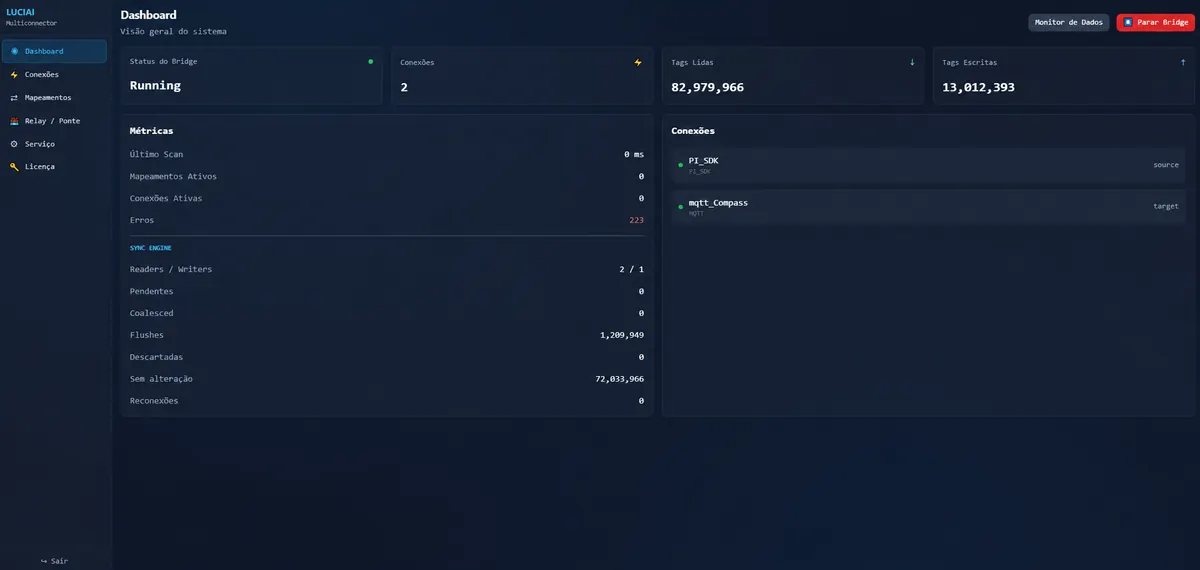
The web interface runs directly on your local plant machine. The dashboard shows whether the bridge engine is running or stopped, tags read and written per second, active connections, and where the latest execution cycle completed.
The Challenge
PLCs, OPC servers, MQTT brokers, enterprise PI historians, and CSV batch files cannot communicate natively. Each link turns into custom scripts, disparate drivers, or ad-hoc spreadsheets. When tag names, offsets, or data types change, integrations fail silently away from the control room.

Tag Mapping Engine
Every source tag routes to one or multiple destination tags. Apply linear scaling, offsets, type conversion, digital bit state lookups, or dynamic payload assembly. Tag maps can be imported, exported, and generated through auto-mapping suggestions.

Bridge Engine
While idle, configure read scan intervals, write throttling, concurrent workers, and batch sizes. When activated, monitor live throughput, read/written counters, active connections, and error buffers.

Multi-Instance Routing
BridgeLink pairs two Luciai Multiconnector nodes over secure WSS channels, routing streams in transit without tag-by-tag remap. Real-time outbound queues and throughput are monitored per link. Pairing is deterministic and manual via endpoints without unmanaged mDNS discovery.

System Service & Licensing
The core runs as a native background service on Windows or Linux systemd. Licensing is generated directly from the local machine fingerprint into a cryptographically signed license file. In High Availability mode, nodes maintain an Active/Standby topology with automatic leader election over a shared database.

Technical Matrix
Comparative overview of field and industrial network protocols, data directions, operating system support, and typical OT/IT integration scenarios.
| Protocol | Category | Data Direction | Operating System | Typical Industrial Use Case |
|---|---|---|---|---|
| OPC UA | Industrial OPC | Source / Destination / Bidirectional | Windows & Linux |
SCADA, DCS, and modern PLC integration with x509 cryptographic security |
| OPC DA | Industrial Classic | Source / Destination / Bidirectional | Windows |
Direct bridging of legacy COM/DCOM OPC servers into modern systems |
| MQTT | IoT / Cloud / Edge | Source / Destination / Bidirectional | Windows & Linux |
Publish and subscribe integration with enterprise brokers and IoT platforms |
| Siemens S7 | PLC Automation | Source / Destination | Windows & Linux |
Direct S7 Ethernet protocol to S7-300, S7-400, S7-1200, and S7-1500 controllers |
| Modbus TCP | Field Bus | Source / Destination | Windows & Linux |
Communication with power meters, RTUs, and distributed industrial transmitters |
| CSV / DAT | Batch / Files | Source / Destination | Windows & Linux |
Automated ingestion or scheduled generation of structured delimited flat files |
| PI SDK | Historian | Source / Destination | Windows |
Native bi-directional streaming to/from OSIsoft PI Data Archive servers |
| PI SDK-COM | Legacy Historian | Source / Destination | Windows |
Access to OSIsoft PI infrastructure through legacy Windows COM automation |
| BridgeLink | Inter-Node Relay | Bidirectional (Relay) | Windows & Linux |
Cross-plant encrypted WSS relay with egress queueing and zero tag-by-tag remap |
Workflow
No separate gateways for each protocol pair. A single, cohesive software deployment.
01
Configure admin credentials, access the web UI, and define source and destination connections with integrated diagnostic connectivity tests.
02
Browse OPC UA nodes, MQTT topics, S7 PLC DB tags, PI points, or CSV fields. Link sources to destinations and apply data transformations only where scales or data types differ.
03
Trigger execution from the dashboard or enable the background OS service. Monitor live reads, writes, queue depths, and operational logs in real time.
Target Roles
Tailored for industrial operational realities without inflated claims.
Connect PLCs, OPC servers, MQTT brokers, historians, and flat files without maintaining custom bespoke scripts or separate one-off middleware boxes.
Maintain bridging logic directly in the browser: start, stop, diagnose communication faults, and update tag scaling rules instantly.
Stream industrial plant data securely between separate Luciai Multiconnector nodes using BridgeLink with end-to-end queue visibility.
Next Step
Tell us which protocols reside at the source and destination, plus your expected tag count. Our team will confirm compatibility and outline deployment options.
Explore More
Dedicated pages covering each technical aspect of the bridging platform.
How the bridge reads, converts, and writes data, and how hardware licensing works.
OPC UA, OPC DA, MQTT, Siemens S7, Modbus TCP, CSV/DAT, OSIsoft PI, and BridgeLink.

Submit your architecture requirements. Our engineering sales team responds promptly.
FAQ
Direct answers on what the product performs across plant floor environments.
It is the industrial data bridge by Luciai Tecnologia. It reads from a source protocol, applies transformation rules when specified, and writes to a target protocol. Operations are completely managed on-premise via an embedded web UI within your plant network.
It natively connects OPC UA, OPC DA (Windows), MQTT, Siemens S7, Modbus TCP, CSV/DAT batch files, OSIsoft PI SDK, PI SDK-COM, and inter-instance BridgeLink. Active drivers depend on your node-locked license.
It runs 100% on-premise at the edge or plant floor. The web dashboard, REST API, and embedded configuration database reside entirely on local hardware as a native Windows Service or Linux systemd daemon.
BridgeLink establishes an encrypted WSS tunnel between two Luciai Multiconnector instances, forwarding data streams with local egress queuing and bandwidth monitoring without manual tag-by-tag remaps.
Yes. The tag mapping engine supports linear multiplier scaling, mathematical offsets, data type casting, digital bit state enumerations, and dynamic JSON payload assembly.
Licensing is bound cryptographically to the host machine's hardware fingerprint. Each license defines authorized protocols, maximum connection counts, and active tag quotas.